Google Home is both an app and a family of speakers, displays, cameras, and doorbells. In 2026 the voice layer on those speakers is in the middle of a change from Google Assistant to Gemini for Home. That change is optional until you opt in, and then, according to Google, it is not optional anymore for that home.
This is a research guide. We did not opt a house into Gemini for Home for this page, and we did not score Nest hardware. If you are choosing a first platform, start with the starter guide. The comparable pages are Amazon Alexa and Apple Home. Radios and Matter versions are in the protocols guide.
What changes when you opt in
Google's help article "Learn about Gemini for Home voice assistant" describes the switch in concrete terms.
- Early access has been rolling out by language and country. You are notified when it is available. The Google Home app is where you accept it. We are not publishing a country list here, because the rollout has moved and the app is the check that matches your account.
- After you switch, Gemini for Home is available to everyone in the home, including on compatible devices you add later.
- Compatible devices stop using Google Assistant. If a device is not compatible now and becomes compatible later, Google says it will switch automatically.
- You cannot switch the home back to Google Assistant.
That last point is the decision. Read it before you tap the button on a shared household account. People who rely on a specific Assistant behavior — a routine syntax, a broadcast habit, a third-party speaker command — should try to learn whether that behavior is in the Gemini for Home description before they opt in. Google's help page is the list. A forum post is not.
Google distinguishes a no-cost set of features from subscription features.
- At no cost, Google lists smart home controls, media search and playback, alarms and timers, calendars, notes, lists, reminders, and general questions.
- Gemini Live, the back-and-forth conversation you start with a phrase such as "Hey Google, let's chat," is described as available on compatible devices with Google Home Premium.
- Camera features such as AI descriptions, AI notifications, and a Home Brief are described, on the related "get started" help page, as requiring the Advanced plan of Google Home Premium.
- "Help me create" automations from a typed description are also described as needing Google Home Premium.
We are not quoting a Premium price. Plan prices change, and the help page we used explains eligibility rather than a tariff. Open the subscription screen in the Google Home app and read what it includes this month.
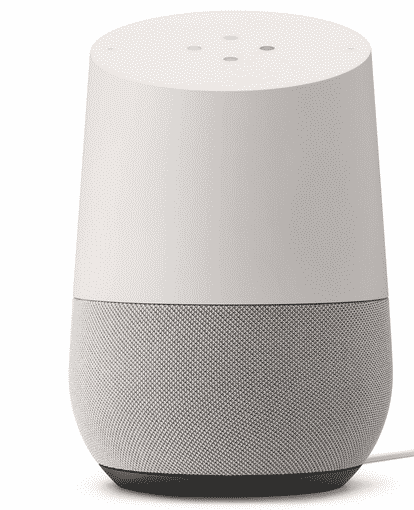
The image on this page is an original Google Home speaker from this site's archive. Google's help page puts that model, along with Nest Wifi points, Google Home Max, and third-party speakers, in the group that gets most Gemini for Home features but not Gemini Live. The page lists a fuller assistant, including devices that can do Gemini Live when the subscription and the rollout allow it: Google Home Speaker (2026), Nest Hub (2nd gen), Nest Audio, Nest Mini (2nd gen), Nest Hub Max, Nest Hub (1st gen), and Google Home Mini (1st gen). Treat that as Google's list on the day we read it, and re-check the help page if you are buying from it.
What to set up first
| Goal | Do this | Do not do this first | Why |
|---|---|---|---|
| Keep Assistant behavior you still need | Read the opt-in consequences and test one spare speaker if you have one | Opt in the only home on the only account | Google says the switch cannot be reversed |
| Control lights you already own | Link the device in the Google Home app and give it a room | Buy a second assistant speaker to "fix" a bulb | The bulb's own cloud is the usual failure |
| A speaker in a room | Use a model whose feature list matches what you want from Gemini Live | Assume every Nest speaker has the same feature set | Google splits full assistant devices from older devices |
| Camera alerts | Read which alerts are included and which need Premium Advanced | Buy cameras for AI summaries you have not confirmed | The help page ties several camera AI features to a plan |
| A typed automation | Try the editor by hand before "Help me create" | Depend on a generated automation you have not read | You still need to understand the trigger and the action |
| Matter devices | Pair one device and look at the traits the app shows | Assume Matter 1.6.1 features are exposed | Specification and app support are different dates |
Our older comparison Amazon Echo vs Google Home is a period piece about the assistants as they worked when it was written. It is not a comparison of Alexa+ and Gemini for Home. Read it for the shape of the choice — speaker, app, household account — and then use the current help pages for features.
Compatibility and limits
The Google Home app is the inventory. Speakers, displays, Wi-Fi devices, and Matter devices appear there as rooms and devices. A few limits are structural.
- Works with Google Home is not Matter. A cloud integration can expose a device that has never heard of Matter. If that company's service ends, the Google link ends. A Matter device is commissioned locally into a fabric and can, when multi-admin works, also sit in another platform.
- Speakers are not equal. Use the help-page split above. A third-party speaker with Google Assistant built in is in the "most features, not Gemini Live" group on the page we read. Confirm before you opt in if that speaker is load-bearing.
- Cameras. Nest cameras and third-party cameras do not gain the same AI features just because they appear as a live tile. Google's help pages separate live video, notifications, and the newer Gemini camera features, and they attach plan requirements to some of them.
- Thermostats. A Nest thermostat can be a Google Home device and still have its own heat-pump and wiring rules. The climate guide is the place for wiring cautions. Voice control does not bypass a missing common wire.
- Matter versions. On November 10, 2026 the Alliance's download page listed Matter 1.6.1 documents. Matter 1.6 was announced June 17, 2026. Matter 1.5.1 (March 31, 2026) refined cameras after 1.5 introduced them. Google Home will expose the slice it has implemented, not the slice the PDF describes. Do not call 1.5.1 current, and do not call a spec feature a Google Home button.
Automations in the Google Home app are triggers and actions. A starter automation is a time and a light. Add a sensor only after the time-based one runs for a few days. "Help me create" can draft an automation if you have the subscription. Read the draft. A generated routine that locks a door or changes heat should be something you can explain out loud before you save it.
Setup, and what fails
- Put the phone on the home Wi-Fi, not a VPN, during setup.
- Update the Google Home app. Google's "what's new" notes have referred to specific app versions for opt-in. If the button is missing, you may not have the rollout yet. That is not a broken speaker.
- Name rooms before you name devices. "Upstairs" as a device name and as a room name will confuse voice.
- Link one brand's account. Confirm the devices appear. Then decide about Gemini for Home.
- If you opt in, tell the household first. The help page says the switch applies to everyone in the home.
- Re-test the two or three voice phrases you actually use. History, timers, and "turn off the lights" are the phrases that matter, not a demo script.
Failures we see described again and again in our older Google articles, and that still match the architecture:
- The speaker is on guest Wi-Fi or on a band the device cannot use.
- The device is in a different home structure in the app, so voice in this home cannot see it.
- A third-party cloud login expired. The speaker is fine. The link is not.
- Two devices share a name.
- Someone expects Gemini Live on hardware Google lists as unsupported for that feature.
Our older pieces on playing music with Google Home, on whether Google Home works without Wi-Fi, and on keeping a Google Home updated are useful as checklists. Re-read any sentence that claims a permanent Assistant behavior. The opt-in above is the change those articles could not know about.
What it costs to own
Do not budget from a rumor of a subscription price. Open the app.
- Speakers and displays have a hardware cost and a standby cost. Measure standby if it matters to you.
- Google Home Premium, and the Advanced tier named for some camera features, are optional until the feature you want sits behind them. Basic controls are described as no-cost.
- Camera history and richer alerts are the usual place a "free camera" stops being free. Read the recording plan before you mount anything. The camera guide is the cross-link.
- Music services are separate subscriptions. A speaker is a player.
- Leaving the platform later is cheaper if the lights are Matter or are simple Wi-Fi devices you can reset, and more expensive if you have a dozen cloud-only integrations and a camera history you care about.
We are not assigning star ratings to Nest Hub, Nest Audio, or the original Google Home. The archive image is identification, not a review score.
Privacy, security, and a manual fallback
A speaker is a microphone. A display with a camera is a camera. Gemini does not change that.
- Use a Google account with two-factor authentication. The home follows the account.
- Review voice and activity controls in the Google account, not only in the speaker settings. Those are different screens.
- Face matching and personal results, where a display offers them, should be an explicit household decision. Do not enroll people who have not agreed.
- Camera accounts and speaker accounts should not be shared with guests. Guests get the Wi-Fi password, not the home admin role.
- Before you opt into Gemini for Home, export or note any Assistant routines you would hate to lose, because Google says you cannot switch the home back.
Manual fallback:
- Lights and heat need buttons. Voice is an extra, not the only path.
- If a speaker mishears in a particular room, move it or shorten device names before you add more microphones.
- You can unplug a speaker. You cannot unplug a cloud link and keep cloud-only features. Know which devices in the house are cloud-only.
- For cameras, a physical shutter or an unplugged indoor camera is the fallback when a guest stays over. Software mute is not visible from across the room.
How to read the older articles
The directory lists every post already in this silo. A review on Google Nest Hub Max and the piece on the Nest speaker are product writing from their own dates. The Nest Hub Max file on this site is a title card, not a lab photo, and this guide does not treat it as evidence of current hardware. Use those articles for feature vocabulary. Use Google's help pages for what Gemini for Home does now.
Frequently asked questions
Can I try Gemini for Home and go back to Google Assistant?
Google's help page says no. Once the home switches, it cannot switch back, and later-compatible devices switch too. If that is unacceptable, do not opt in.
Does every Nest speaker get Gemini Live?
No. Google lists specific speakers and displays for the full assistant and says older devices, including the original Google Home, Nest Wifi points, Google Home Max, and third-party speakers, get most features but not Gemini Live. Gemini Live also requires Google Home Premium on compatible devices.
Are camera AI summaries included with the speaker?
Not according to the help page we checked. AI descriptions, AI notifications, and Home Brief are described as needing the Advanced plan of Google Home Premium. Confirm the plan name in the app before you buy a camera for that reason.
Will my existing routines survive the switch?
Do not assume it. Read Google's current description, and copy down any routine you depend on before you opt in. We did not migrate a home for this guide.
Does Google Home replace a Matter controller?
The Google Home app can control Matter devices it supports. It does not implement every Matter release on the day the Alliance publishes a PDF. Matter 1.6.1 documents were listed on the Alliance download page on November 10, 2026. That is a specification fact, not a statement about buttons in the app.
Is the original Google Home speaker still a good buy?
We are not making that call, and we did not test one for this page. Google's help page still lists it for most Gemini for Home features, excluding Gemini Live. Whether to buy used hardware is a separate question about updates and microphones, which we did not measure.
Sources
Checked November 10, 2026.
- Google Nest Help, "Learn about Gemini for Home voice assistant," including the irreversible opt-in, the no-cost feature list, Gemini Live's subscription requirement, and the device split: support.google.com/googlehome/answer/16618650.
- Google Nest Help, "Get started with Gemini for Home features," including camera AI features on the Advanced plan and "Help me create": support.google.com/googlehome/answer/16613534.
- Connectivity Standards Alliance, Matter 1.6 (June 17, 2026) and the note that adoption timelines belong to each company: Matter 1.6 announcement.
- Alliance specification downloads listing Matter 1.6.1 as well as earlier documents, checked November 10, 2026: specification downloads.
- Alliance, March 31, 2026, Matter 1.5.1 camera refinements: Matter 1.5.1 announcement.
Articles already on this site
These pages were already on Smart Homes Reviews before this guide. They keep their original wording. Read them as a library of earlier articles, not as new tests or a current ranking.
Posts in this topic
- A Review On Google Nest Hub Max
- Cracking About The New Google Nest Home Speaker
- Does Google Home Need Some Upgrade?
- Does Google Home Work in the Absence of Wi-Fi Connectivity?
- Google Announced New Products During Its Annual Event
- Google Plans Shutting Down Efficiently Android Things
- Guide on Playing Music Using Google Home
- How Does ‘Downtime’ Help Google Assistant Users?
- How To Control Smart Home Devices With Google Assistant
- How to Keep Your Google Home Updated?
- How to Use Google Nest Hub Max’s Look and Talk?
- How to Use Quick Gestures on Google Assistant?
- Important Google Updates That Smart Home Owners Should Know