Security gadgets are additions to a door, a window, and a habit. The order of operations is the physical door first, then a way to know it opened, then a way to see who is there, then an alarm if you still want one. Reversing that order is how people end up with a keypad on a door that does not latch.
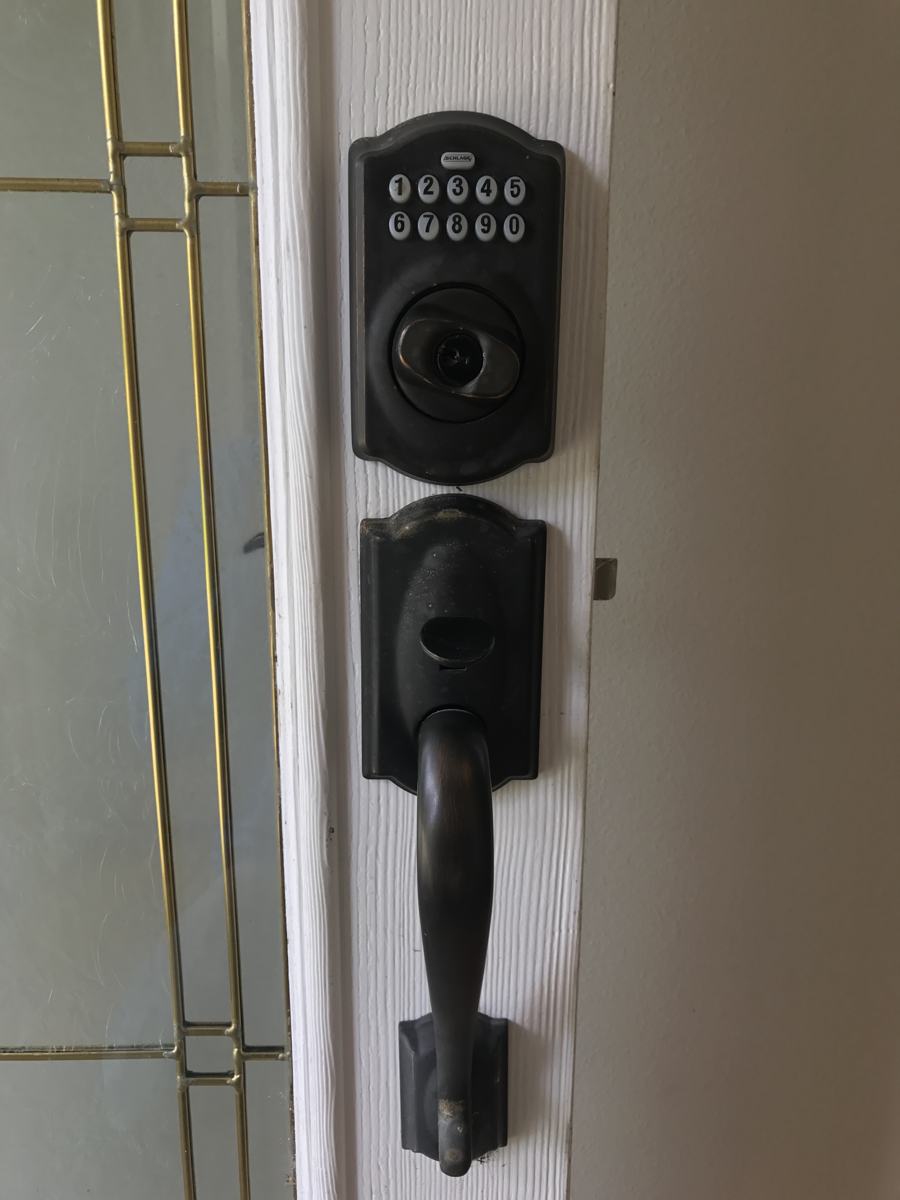
This guide is research. There are no kick-test results and no "most secure lock" award. The photo is one installed keypad deadbolt, credited below, so you can see what "installed on a door" looks like. It is not a 2026 buying winner. Cameras are in the camera guide. Radios and Matter are in the protocols guide. Households with children, guests, or people who need simpler entry should also read the family guide.
What to change first
| The weak point you can see | A gadget that might help | A gadget that does not fix it | Do this before you buy |
|---|---|---|---|
| The door does not latch without a slam | None, until the strike and hinges are adjusted | A smart lock on a misaligned door | Fix the alignment. A motor cannot solve a crooked strike forever |
| You lose keys | A keypad or a phone credential, plus a spare physical key stored off the door | A lock with no key and no other override | Decide where the spare key lives before you install |
| You want a phone alert when a door opens | A contact sensor | A camera that might miss a slow open | Name who receives the alert and what they are supposed to do |
| You want an alarm siren | A real alarm panel or a DIY kit whose siren you have heard | A speaker routine that plays a sound | A siren people sleep through is not a plan. Know the sound |
| You rent | A removable sensor, if the lease allows adhesives | Replacing the deadbolt without written permission | Ask. Restoring the original lock is part of leaving |
| Someone needs entry without a phone | A code, a key, or a fob, with a way to revoke it | "They can use my phone" | Phones get lost, and shared logins are how access lingers |
Top 5 Affordable Motion Sensors is an older list. A motion sensor sees movement. It does not know intent. Pair the idea of motion with a contact sensor on the door you actually care about, or you will alert on the dog and ignore the door. We are not re-ranking that list.
Compatibility and limits
Locks and sensors speak whatever radio the package includes.
- Wi-Fi locks join the router. They are easy to put in a vendor app and often depend on that cloud for remote lock and unlock. Remote unlock is the feature to be careful with. A local keypad still works when the cloud does not, on models that are built that way. Confirm it for the model. Do not assume it.
- Bluetooth locks are often phone-nearby products. They are a poor fit if the main goal is unlocking from another city.
- Zigbee or Z-Wave locks need the matching hub. They are a reasonable fit if you already run that hub and you want the lock in the same automations as the lights. They are a bad first purchase if you do not have the hub.
- Matter. Locks exist as a device type in the Matter world, but controller support is the check. The Alliance's June 17, 2026 Matter 1.6 note says features reach products on each company's timeline, and the download page on November 10, 2026 listed 1.6.1 documents newer than the March 31, 2026 camera-focused 1.5.1 release. None of that is a promise that a particular lock's remote unlock, codes, or history appear in Apple Home, Google Home, or Alexa. Pair in the vendor app first if the manual says to, then add the platform.
- Apple Home Collection. Apple's October 13, 2026 HomeView announcement describes a lock designed with partners, as an announced product. HomeView itself is not available until November 13, 2026. Do not buy a door preparation for a lock that is not in your hands. Details are in the Apple Home guide.
- Alarm kits. A DIY alarm is a set of sensors, a siren, and a path to your phone. Professional monitoring is a service contract with people who call you or the authorities. Those are different products. A box of sensors is not monitoring. If you want monitoring, read the contract, the permit rules where you live, and what happens in a false alarm. We are not describing a specific vendor's response time. We did not measure one.
Codes are credentials. A keypad that supports unique codes per person lets you delete one person. A single shared code does not. That feature is more important than the finish of the metal.
Auto-unlock based on a phone's location fails when the phone dies, when location permission is denied, or when someone else is carrying the phone. It is a convenience. It is not the only way in.
Setup, and what fails
- Close the door from the outside and see if the existing deadbolt throws without force. If it binds, fix the door before you motorize the bind.
- Read whether the new lock replaces the deadbolt, the latch, or both. Photograph the old hardware so you can restore it.
- If you rent, get permission in writing if the install replaces hardware.
- Install with the battery charged. Set a unique admin code that is not a birthday and not the default in the manual.
- Set a second code for another person, then delete a test code, so you know revocation works.
- Lock and unlock from the keypad with the Wi-Fi router off, if you care about outages. Write down the result.
- Only then link a voice assistant. Do not create a voice phrase that unlocks the door unless you fully accept that anyone who can speak in the microphone's room might use it. A lock confirmation in an app is safer than a shouted unlock.
- Put the physical key where a dead phone does not trap you outside, and not under the mat.
Failures:
- The backset or the door thickness does not match the lock. Check both numbers on the package against the door. This is a measuring job, not a software job.
- The strike is off by a few millimeters. The motor grinds and then reports a jam. That is the door, not the app.
- A winter battery sag in a cold vestibule. Battery locks need a battery habit. Cold makes it worse. We are not quoting a battery life. Assume you need a spare pack.
- The previous resident's account is still the owner. Factory-reset before you trust a used lock. If you cannot reset it, do not buy it.
- An automation unlocks because a sensor bounced. Disable that automation. Door locks should not be a side effect of a light routine.
If you cut a new hole and then cannot finish, stop and restore the old lock the same day. Sleeping behind a half-installed deadbolt is worse than the original door.
What it costs to own
No prices in this guide. The costs that surprise people are:
- A locksmith or a carpenter when the door was not square.
- Replacement hardware if you drilled and then returned the lock. Returns do not fill screw holes.
- Batteries, and the time to replace them before a trip.
- An alarm monitoring contract, if you choose one, plus any permit or false-alarm fee your city charges. Look those up locally. We will not invent a fee schedule.
- A camera plan if the "security system" is actually a doorbell. See the camera guide.
- The cost of a lost override. If the only key is inside the house, a lockout is a call to a locksmith. That is the price of skipping the spare key.
A cheap sensor on a door you already lock is often a better spend than a motor on a door you have not adjusted. The older "affordable" lists on this site are not current price surveys. Treat the word affordable as the author's framing at the time, not as a measured price.
Privacy, security, and a manual fallback
- The keypad is a credential store. Unique codes, deleted when people leave.
- The app account needs two-factor authentication. The lock is only as private as that account.
- History of who unlocked is useful and sensitive. Do not share the admin login with a contractor. Give them a code and delete it.
- Voice unlock is optional and usually a bad default in a home with guests, kids, or a speaker near a window.
- Tamper alerts on a sensor are only useful if a person sees them. Decide who is the after-hours contact.
- Do not publish lock brands plus your address, and do not post a photo that shows the code.
Manual fallback is the point of this section, not an appendix.
- A physical key or an equivalent mechanical override, tested.
- A door that latches with the electronics removed, or a plan to reinstall the old deadbolt the same day.
- Sensors that fail open in the sense that a dead sensor does not unlock anything. A failed sensor should mean "no alert," not "door opens."
- If you use an alarm siren, know how to silence a false alarm without deleting the system, and tell neighbors what the sound means so they are not guessing.
Professional monitoring, if you pay for it, should have a written password and a duress process you have read. If you do not want that relationship, do not buy a contract because the box included a sticker.
How to read the older articles
Posts in this silo compare products such as alarm brands, describe door hardware, and list motion sensors. They are preserved as written. Best smart devices that improve your home security and the ADT piece are examples of that library. They are not updated threat models. Use them to see which device types exist. Use a current manufacturer sheet for bolt type, door thickness, and radio. Use a local source for anything about permits or filming.
Frequently asked questions
Do I still need a key if I have a smart lock?
Yes. Phones die, batteries sag, and accounts get locked. A non-network way in, stored away from the door, is part of the install. If the model has no mechanical override, know that before it is on the only door.
Will a smart lock work with no internet?
Many keypads still accept a code locally, and many remote features do not. Test the keypad with the router off before you rely on it. We are not claiming every model behaves this way.
Is a contact sensor an alarm?
No. It is a message that two pieces of a sensor moved apart. An alarm is what you do with that message: a siren, a person who responds, or both. A notification you sleep through is a log.
Can I install a lock in a rental?
Only with permission if you are replacing hardware or drilling. Adhesive sensors may still violate a lease. Ask, and keep the original lock and strike so you can restore them.
Should the lock auto-unlock when I come home?
Only if you accept the failure cases: a phone in someone else's pocket, a location glitch, a permission change after an OS update. A keypad code you type is less magical and easier to explain.
Does Matter mean any hub can unlock the door?
No. It means there is a standard the lock might implement and a controller might support. Confirm remote unlock, codes, and history in the app you will actually use. The Alliance's own 1.6 announcement says adoption dates belong to each company.
Sources
Checked November 10, 2026.
- Connectivity Standards Alliance, June 17, 2026, Matter 1.6 and company-by-company timelines: announcement.
- Alliance specification downloads, November 10, 2026, listing Matter 1.6.1 documents above 1.5.1: downloads.
- Apple Newsroom, October 13, 2026, HomeView availability beginning November 13 and a described lock in Apple Home Collection: announcement.
- Thread Group on Thread as a network rather than an app, relevant if a lock or sensor is Thread-based: Thread with Matter.
Articles already on this site
These pages were already on Smart Homes Reviews before this guide. They keep their original wording. Read them as a library of earlier articles, not as new tests or a current ranking.
Posts in this topic
- ADT Security Works With Google for Smart Home Security
- Are Smart Homes Really Burglar-proof?
- Best Smart Devices That Improve Your Home Security
- Getting to Know Eufy Smart Lock Touch
- Getting to Know Panic Button System
- Getting To Know Recessed Door Sensor
- How to Get the Best Security System For Your Smart Home?
- KERUI Wireless Intelligent PIR Motion Sensor Alarm Detector Review
- Smart Tips to Keep Your Home Protected While You’re Away
- The Best Smart Locks to Protect Your Home In and Out
- Things You Should Know About Smart Locks
- Top 5 Affordable Motion Sensors
- What Should You Choose Between Lifeshield and Ring Alarm?
- When Do You Need to Replace Your Smart Smoke Detectors?
- YALE Digital Door Lock/ Fingerprint Door Lock Review